MV3 CERTIFIED 100% Client-Side · Zero Telemetry · Local IndexedDB

Turn Browser Workflows into Production-Ready Automation in Seconds.

Workflow Recorder captures your clicks, form submissions, and navigations with an intelligent 7-tier selector scoring engine. Instantly export to clean Playwright, Puppeteer, Cypress, and Selenium scripts — completely offline and privacy-first.

★★★★★ 5.0 / 5.0 (Chrome Web Store)
PrivacyGuard Active
Chrome 120+, Edge, Brave & Opera
100%
Offline & Local Processing
8 Targets
Playwright, Puppeteer, Selenium +
7 Tiers
Selector Resilience Fallbacks
0 ms
External Telemetry Latency
Interactive Simulator

Test Drive Workflow Recording Live in Your Browser

Interact with the simulated web app on the left. Watch the real-time recording engine score selectors and synthesize production-ready test automation scripts on the right.

https://app.cloudcorp.io/login

CloudCorp Enterprise Portal

Click fields below to trigger recording events.

1 Step
00:09 REC
Active Target: [data-testid="email-input"]
Score 98/100
Product Gallery

Engineered for Developer Clarity & Speed

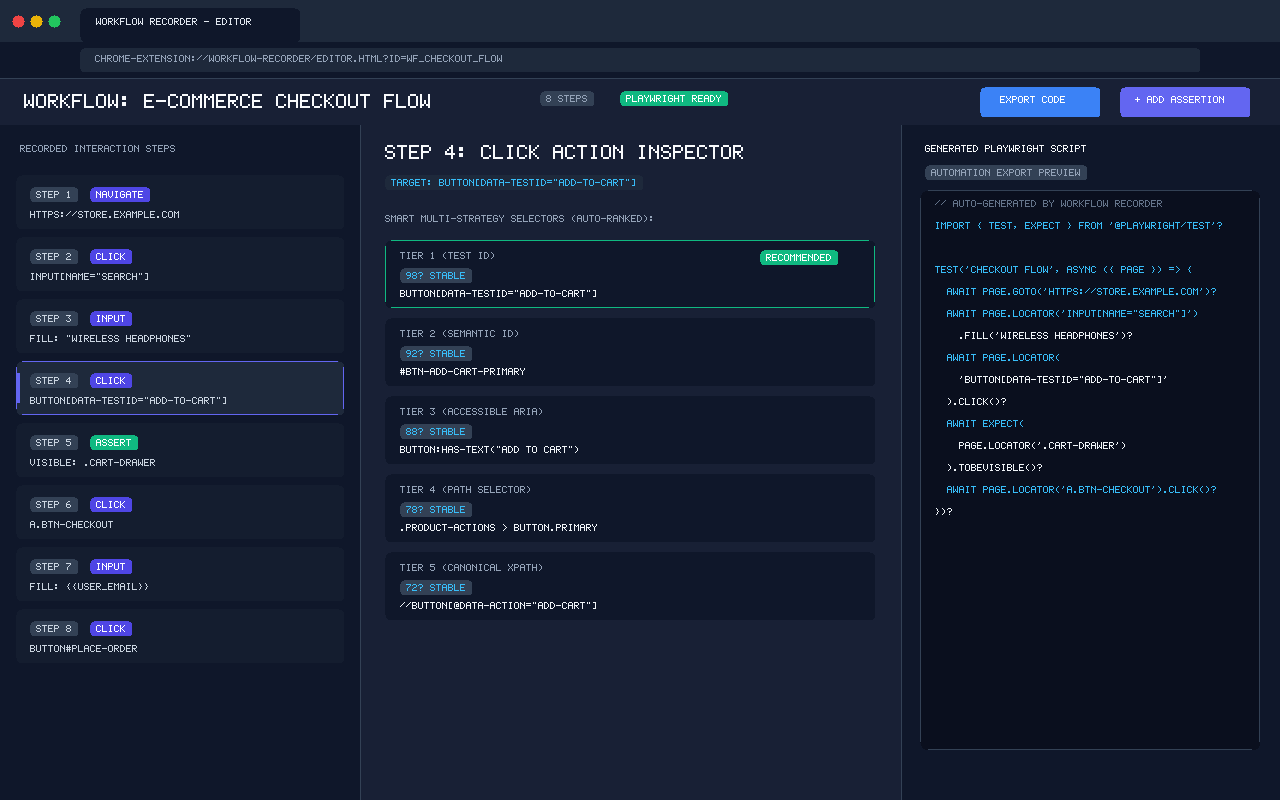
Explore the 3-panel workflow studio, non-intrusive in-page recording HUD, resilient selector scorer, and instant multi-target code exporters.

Architecture & Features

Built from the Ground Up for Resilient Automation

Say goodbye to brittle screen coordinates and flaky CSS classes. Workflow Recorder uses semantic DOM analysis and fallback chains designed for real-world enterprise web applications.

7-Strategy Resilient Selectors

Evaluates test IDs, accessible ARIA roles, semantic IDs, text anchors, and XPath in real time. Each selector is scored so your test scripts never break when design classes change.

  • data-testid, data-cy, and data-qa priorities
  • Accessible role & name combination locators
  • Fallback chaining if an element ID mutates

Noise Filtering & Event Normalization

Keystrokes are automatically collapsed into single input events. Rapid double-clicks, scroll jitters, and internal recorder HUD clicks are cleanly filtered out.

  • Auto-debounced scroll & resize listener
  • Intelligent typing grouping into atomic fills
  • Discards HUD clicks via Shadow DOM isolation

Dynamic Variable Extraction

Scans your workflow inputs and automatically detects emails, phone numbers, auth tokens, and dates. Replaces hardcoded literals with reusable {{variable}} templates.

  • Auto-detects emails, dates, numbers, and URLs
  • Configurable environment variable bindings
  • Export TypeScript interfaces for type safety

Shadow DOM & iFrame Traversal

Modern micro-frontends and Web Components rely heavily on shadow roots. Workflow Recorder captures path chains across shadow boundaries and nested cross-domain iframes.

  • Pierces open shadow boundaries automatically
  • Generates Playwright frameLocator() syntax
  • Handles dynamic embedded widgets effortlessly

PrivacyGuard & Zero Telemetry

Operates 100% offline in your browser's local IndexedDB. Passwords, credit cards, CVVs, SSNs, and sensitive query tokens are automatically detected and masked before saving.

  • Automatic password and token redaction
  • Zero third-party analytics or external network calls
  • Full data ownership with local export and delete

In-Page Floating Controller HUD

No need to switch back and forth between tabs. The floating controller bar stays on your page, letting you pause, resume, add visual assertions, and inspect step counts live.

  • Draggable HUD completely isolated in Shadow DOM
  • 1-click assertion insertion (text, visible, value)
  • Real-time step counter and recording timer

The 7-Tier Selector Cascade

How Workflow Recorder scores and ranks locators for unbreakable tests

Tier 1Score 98/100
data-testid
[data-testid="submit-btn"]
Tier 2Score 92/100
Accessible ARIA
role="button"[name="Submit"]
Tier 3Score 88/100
Semantic ID
#user-checkout-submit
Tier 4Score 76/100
Text Anchor
button:has-text("Sign in")
LIVE SCORING ENGINE

Interactive Selector Stability Gauge

Test any CSS selector, XPath, or data attribute in real time to calculate its resilience score and flake probability.

Detailed Architecture →
100
/ 100 PTS
Rock Solid
Try Sample Selectors:
Hierarchy Tier
Tier 1 (Test ID)
DOM Uniqueness
Unique (1:1)
Fragility Penalty
0% (None)
Automation Exporters

Export Clean, Production Code for Any Framework

Workflow Recorder exports clean, standard scripts ready to plug straight into your GitHub Actions, GitLab CI, or local test suites. No proprietary lock-in.

tests/workflow.spec.ts
import { test, expect } from '@playwright/test';

interface WorkflowVariables {
  userEmail: string;
  authRole: string;
}

test('Enterprise Checkout & Order Verification', async ({ page }) => {
  const vars: WorkflowVariables = {
    userEmail: process.env.TEST_EMAIL || 'qa-engineer@enterprise.io',
    authRole: 'admin',
  };

  // Step 1: Open Application
  await page.goto('https://app.cloudcorp.com/dashboard');

  // Step 2: Resilient Selector with Multi-Candidate Fallback
  const searchInput = page.locator('[data-testid="search-bar"], #global-search, input[placeholder*="Search"]');
  await searchInput.fill('High-Performance Cluster');
  await searchInput.press('Enter');

  // Step 3: Wait for Results & Select Card
  const resultCard = page.locator('[data-testid="result-item-0"]');
  await expect(resultCard).toBeVisible({ timeout: 5000 });
  await resultCard.click();

  // Step 4: Add to Provision Queue
  await page.getByRole('button', { name: 'Provision Asset' }).click();

  // Step 5: Assertion
  await expect(page.locator('.toast-notification')).toContainText('Provisioning queued');
});
Feature Comparison

Headless Recorder & DevTools Alternative: How We Compare

Compare Workflow Recorder against Headless Recorder, Chrome DevTools Recorder, and Selenium IDE. Engineered with 7-tier selector scoring, zero telemetry, and multi-framework export.

Feature / Capability Workflow Recorder Headless Recorder DevTools Recorder Selenium IDE
7-Tier Selector Scoring (data-testid, ARIA, ID) ✓ Yes (0-100 Score) Basic CSS/XPath Single locator path ✕ Fragile XPath
Dynamic Class Rejection (CSS-in-JS, Tailwind) ✓ Automatic Pruning ✕ Records hashes ✕ Records hashes ✕ Records hashes
Multi-Framework Export (Playwright, Puppeteer, Selenium, Cypress) ✓ 8 Targets Ready Puppeteer/Playwright JS JSON & Puppeteer Selenese format only
Zero External Telemetry (100% Client-Side) ✓ 100% Local (0 calls) Third-party links ✓ Built-in Chrome Varies by version
Automatic Password & Credential Redaction ✓ PrivacyGuard ({{password}}) ✕ Captures plaintext ✕ Stores plaintext ✕ Stores plaintext
Dynamic Variable Parameterization (${vars}) ✓ Typed TypeScript Interface ✕ None ✕ None Basic manual vars
Shadow DOM & Cross-Frame iFrame Piercing ✓ Native Piercable Chains Limited ✓ Piercable ✕ Unsupported
In-Page Non-Intrusive Floating Controller HUD ✓ Isolated Shadow Root ✕ Popup only ✕ DevTools pane ✕ Separate window
Simple 3-Step Workflow

From Browser Clicks to Automated Suite in Minutes

No complex setup or CLI installations needed to start recording. Here is how simple testing becomes:

Click Record

Pin the extension in your Chrome toolbar. Click "Start Recording" and perform user flows naturally on any website or web application.

Inspect & Refine

Open the 3-panel visual editor. Review recorded steps, reorder actions, attach visual assertions, and bind inputs to dynamic variables.

Export 1-Click Code

Choose your favorite automation framework (Playwright, Puppeteer, Cypress, Selenium). Copy the code or download the script directly into your repository.

Easy Installation

Install Workflow Recorder in Under 60 Seconds

Available directly on the Chrome Web Store or loadable offline as an unpacked Manifest V3 developer extension.

Developer Mode (Build from Source)

Run directly from source code with full inspection, customization, and local test capabilities.

1 Clone the repository: git clone https://github.com/workflow-recorder/workflow-recorder.git
2 Install dependencies & compile: npm install && npm run build
3 Open chrome://extensions, enable Developer mode, click Load unpacked, and choose dist/.
View Developer Build Guide
Knowledge Base

Frequently Asked Questions

Everything you need to know about privacy, permissions, selectors, and automation exports.

Yes, Workflow Recorder is 100% free and open-source. There are no paid subscriptions, no credits, no usage caps, and no mandatory account logins. You can record unlimited workflows and export unlimited automation scripts.
Zero telemetry. Workflow Recorder operates strictly client-side inside your browser sandbox. All workflow data, step definitions, and screenshots are saved in your computer's local IndexedDB. No external analytics, tracking pixels, or remote servers are ever queried.
Instead of relying on random auto-generated CSS classes (like Tailwind or CSS Modules hash strings), Workflow Recorder generates up to 7 distinct selector tiers for every recorded action: data-testid, accessible ARIA roles, semantic IDs, text anchors, optimized CSS, and XPath. Each selector receives a confidence score (0–100). If one selector breaks during future app redesigns, the fallback chain keeps your test running.
Yes. The Manifest V3 service worker includes a dedicated TabManager that tracks tab switches, popup windows, and URL redirections, generating corresponding page.waitForEvent('popup') or context.waitForEvent('page') steps in your exported Playwright script.
Yes! The exported files are standard ES modules or Python scripts. You can drop them directly into any GitHub Actions, GitLab CI, Jenkins, or CircleCI runner and execute them using standard runner commands like npx playwright test.
Each permission is strictly required for local recording: storage saves your workflows in local IndexedDB; tabs detects page navigations; scripting injects the passive recording listener on the active page; and downloads lets you save your generated test script files to your computer.

Ready to Automate Your Browser Workflows?

Join thousands of developers and QA engineers who record and export bulletproof test automation in seconds. Free forever.

Read Documentation & Guides
No credit card required · Instant setup · Chrome Manifest V3 Certified